
IC7-MAX3
Written by Charles Husemann on 5/7/2004 for
PC
More On:
IC7-MAX3
I’ve always been a big fan of Abit motherboards. The first computer I put together was built around a BH6 and ever since then I’ve been a loyal Abit (OK I had an affair with a Soyo board once but that ended badly and it didn’t mean anything). I was a little hesitant to replace my BH7 with a new board but after taking a look at the following specs it was a pretty easy decision.
Chipset
- Intel 875P / ICH5 RAID
- Support Intel CSA Gigabit LAN
- Supports Dual Channel DDR 400 with ECC function
- Supports Performance Acceleration Technology (PAT) function
- Supports Advanced Configuration and Power Management Interface (ACPI)
Memory
- Four 184-pin DIMM sockets
- Supports 4 DIMM Dual DDR 400 memory.(Max. 4GB)
- Supports configurable ECC function
Physically, the IC7-Max 3 is a little bigger than my old BH7 and it filled the entire cavity of the case I installed it in. The board has five PCI slots, one AGP. You may never use the PCI slots though, as the board provides most of your basic needs with six channel audio and gigabit Ethernet included. Got SATA? It’s also included on the board and you can connect up to six SATA drives to this puppy without breaking a sweat. You can configure it in either two channel or four channel RAID.
With the OTES fan sitting in the back, some connectors have to go. The board has done away with parallel and large serial connectors leaving the mouse and keyboard serial connectors. This isn't a problem unless you are like me who has a parallel port only printer. But all printers and devices are using USB nowadays so this change is rather welcomed.
Softmenu is here and it's a staple of ABIT boards. If you are an overclocker or a tweaker, all you need to do is hit the BIOS and adjust your settings. FSB can be increased in 1MHz increments. AGP/PCI bus speeds can be locked so that overclocking the board doesn't affect the cards. "Game Accelerator" settings of Turbo, Street Racer, and F1 adjusts the DRAM latency time settings with each instance being more aggressive.
Installing the IC7-Max is standard fare but Abit has made things a lot easier by laying out the motherboard nicely. Side mounted IDE headers make hooking up and wiring your drives much easier. It’s kind of silly but it seems easier to slide them into place versus pushing them down into the board. Abit also did a nice job of placing the power headers on the sides of the board so you don’t have to run power cables across the board. Inserting the CPU is easy but with the OTES cooling system installing the stock Pentium4 heat sink is a little tight. Getting the heat sink out is not going to be a lot of fun. The motherboard has five three-pin but only two of them are available for use (the OTES system, CPU Fan, and northbridge fan use one header each). One thing I missed from my BH7 was the AGP retention device (it was basically a DIMM holder for the AGP slot). Not a big deal but I thought it was kind of cool.Abit includes almost everything you’ll need to hook up all of your devices in the box. One black rounded IDE, one black rounded floppy cable along with six SATA cables and some nice molex to SATA power cables are included in the box. It would have been nice to have another dual IDE cable but given the board’s capabilities, it’s not too unexpected. Abit also tossed in an additional set of USB/1394 headers on a rear bracket (for a total of eight USB headers and three 1394 headers).
The IC7-Max 3 also comes with the Secure IDE system which is a hardware based encryption system that allows you to protect data. In order to access the data, you need to have one of the two firewire keys installed on the computer. Without either of these keys, the data is locked away from prying eyes. And it's OS independent so it doesn't matter if your run Linux, Windows, or some other operating system. I was going to try this system out but I tend to lose things and I kind of need the data on my hard drive.
I ran into my first problem when I got everything installed, powered up the system and began to re-install the OS. The Intel 875 chipset used by the IC7 requires high speed memory, at least PC3200, so my two sticks of Crucial PC2700 RAM were not quite fast enough to create a stable environment. This caused all kinds of fun instability problems until I installed two 512 MB sticks of Kingston Hyper-X PC4000 RAM, Then life was good.
I tested the motherboard with the Kingston RAM, Radeon 9800 Pro, and a Pentium 4 2.66 (the old 533 FSB chip, not one of the fancy 800 FSB chips). I did some benchmarks with the BH7 but the switch in RAM invalidated the benchmarks (for those who care the motherboard and faster RAM generated about a 10 percent increase in performance). Here are some performance benchmarks
Since one of the big features of the IC7-Max 3 is the OTES cooling system, I ran a temperature check to see how well it works. To do this, I booted the system up, let the temperature stabilize for twenty minutes, took a temperature reading, and then ran Sandra memory and CPU benchmarks for 20 cycles to stress the system. I then noted the highest score reported by Sandra.
The IC7-Max 3 is certainly one of the better motherboards on the market if you’ve got the hardware to feed it. The only thing the IC7-Max 3 really lacks is a built in media reader but other than that you’d be hard pressed to find something that the IC7-Max 3 lacks.
Chipset
- Intel 875P / ICH5 RAID
- Support Intel CSA Gigabit LAN
- Supports Dual Channel DDR 400 with ECC function
- Supports Performance Acceleration Technology (PAT) function
- Supports Advanced Configuration and Power Management Interface (ACPI)
Memory
- Four 184-pin DIMM sockets
- Supports 4 DIMM Dual DDR 400 memory.(Max. 4GB)
- Supports configurable ECC function
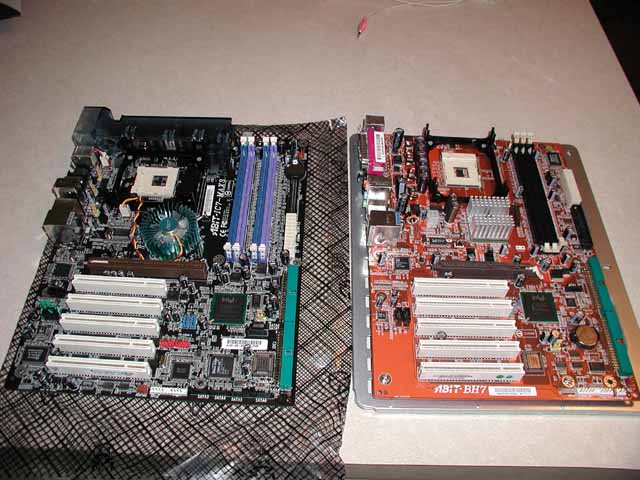
IC7 on the left, BH7 on the right
Physically, the IC7-Max 3 is a little bigger than my old BH7 and it filled the entire cavity of the case I installed it in. The board has five PCI slots, one AGP. You may never use the PCI slots though, as the board provides most of your basic needs with six channel audio and gigabit Ethernet included. Got SATA? It’s also included on the board and you can connect up to six SATA drives to this puppy without breaking a sweat. You can configure it in either two channel or four channel RAID.
With the OTES fan sitting in the back, some connectors have to go. The board has done away with parallel and large serial connectors leaving the mouse and keyboard serial connectors. This isn't a problem unless you are like me who has a parallel port only printer. But all printers and devices are using USB nowadays so this change is rather welcomed.
Softmenu is here and it's a staple of ABIT boards. If you are an overclocker or a tweaker, all you need to do is hit the BIOS and adjust your settings. FSB can be increased in 1MHz increments. AGP/PCI bus speeds can be locked so that overclocking the board doesn't affect the cards. "Game Accelerator" settings of Turbo, Street Racer, and F1 adjusts the DRAM latency time settings with each instance being more aggressive.
Installing the IC7-Max is standard fare but Abit has made things a lot easier by laying out the motherboard nicely. Side mounted IDE headers make hooking up and wiring your drives much easier. It’s kind of silly but it seems easier to slide them into place versus pushing them down into the board. Abit also did a nice job of placing the power headers on the sides of the board so you don’t have to run power cables across the board. Inserting the CPU is easy but with the OTES cooling system installing the stock Pentium4 heat sink is a little tight. Getting the heat sink out is not going to be a lot of fun. The motherboard has five three-pin but only two of them are available for use (the OTES system, CPU Fan, and northbridge fan use one header each). One thing I missed from my BH7 was the AGP retention device (it was basically a DIMM holder for the AGP slot). Not a big deal but I thought it was kind of cool.Abit includes almost everything you’ll need to hook up all of your devices in the box. One black rounded IDE, one black rounded floppy cable along with six SATA cables and some nice molex to SATA power cables are included in the box. It would have been nice to have another dual IDE cable but given the board’s capabilities, it’s not too unexpected. Abit also tossed in an additional set of USB/1394 headers on a rear bracket (for a total of eight USB headers and three 1394 headers).
The IC7-Max 3 also comes with the Secure IDE system which is a hardware based encryption system that allows you to protect data. In order to access the data, you need to have one of the two firewire keys installed on the computer. Without either of these keys, the data is locked away from prying eyes. And it's OS independent so it doesn't matter if your run Linux, Windows, or some other operating system. I was going to try this system out but I tend to lose things and I kind of need the data on my hard drive.
I ran into my first problem when I got everything installed, powered up the system and began to re-install the OS. The Intel 875 chipset used by the IC7 requires high speed memory, at least PC3200, so my two sticks of Crucial PC2700 RAM were not quite fast enough to create a stable environment. This caused all kinds of fun instability problems until I installed two 512 MB sticks of Kingston Hyper-X PC4000 RAM, Then life was good.
I tested the motherboard with the Kingston RAM, Radeon 9800 Pro, and a Pentium 4 2.66 (the old 533 FSB chip, not one of the fancy 800 FSB chips). I did some benchmarks with the BH7 but the switch in RAM invalidated the benchmarks (for those who care the motherboard and faster RAM generated about a 10 percent increase in performance). Here are some performance benchmarks
| Final Fantasy XI | 4799 |
| X2 Rolling Demo | 94.857 |
| Commanche 4 Benchmark | 51.01 |
| 3dMark | 5541 |
| PCMark04 | 3495 |
| Aquamark | 39,249 |
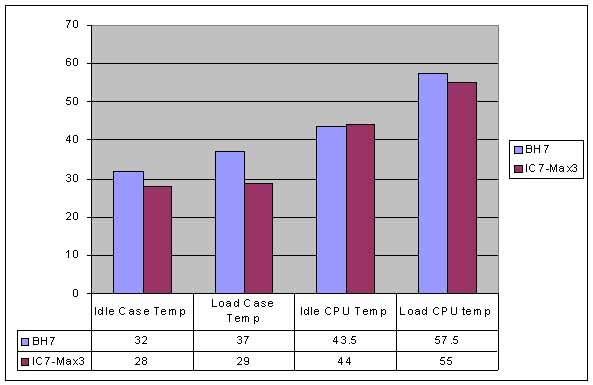
The IC7-Max 3 is certainly one of the better motherboards on the market if you’ve got the hardware to feed it. The only thing the IC7-Max 3 really lacks is a built in media reader but other than that you’d be hard pressed to find something that the IC7-Max 3 lacks.
A near perfect board for hardcore gamers who have the right equipment. It's got everything you need under the hood and more.
Rating: 9 Excellent
* The product in this article was sent to us by the developer/company.

About Author
Hi, my name is Charles Husemann and I've been gaming for longer than I care to admit. For me it's always been about competing and a burning off stress. It started off simply enough with Choplifter and Lode Runner on the Apple //e, then it was the curse of Tank and Yars Revenge on the 2600. The addiction subsided somewhat until I went to college where dramatic decreases in my GPA could be traced to the release of X:Com and Doom. I was a Microsoft Xbox MVP from 2009 to 2014. I currently own stock in Microsoft, AMD, and nVidia.
